Text-to-Speech (TTS) & Voice Cloning
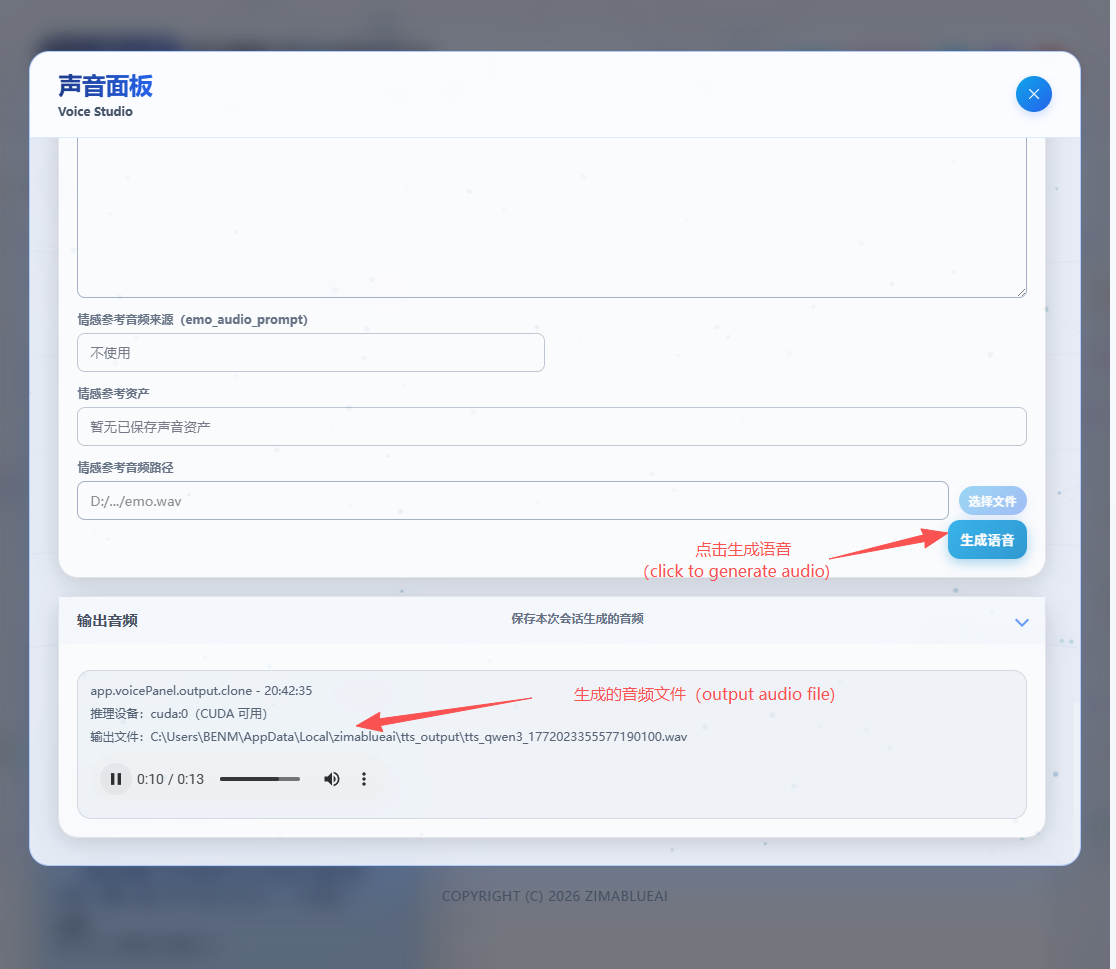
Boundless Flow not only "understands" your words but also "speaks" your text. Through the built-in Python Bridge and local models, it provides powerful Text-to-Speech (TTS) and voice cloning capabilities. The system currently integrates two core engines: Qwen3-TTS and Index-TTS2, to meet various scenario needs.
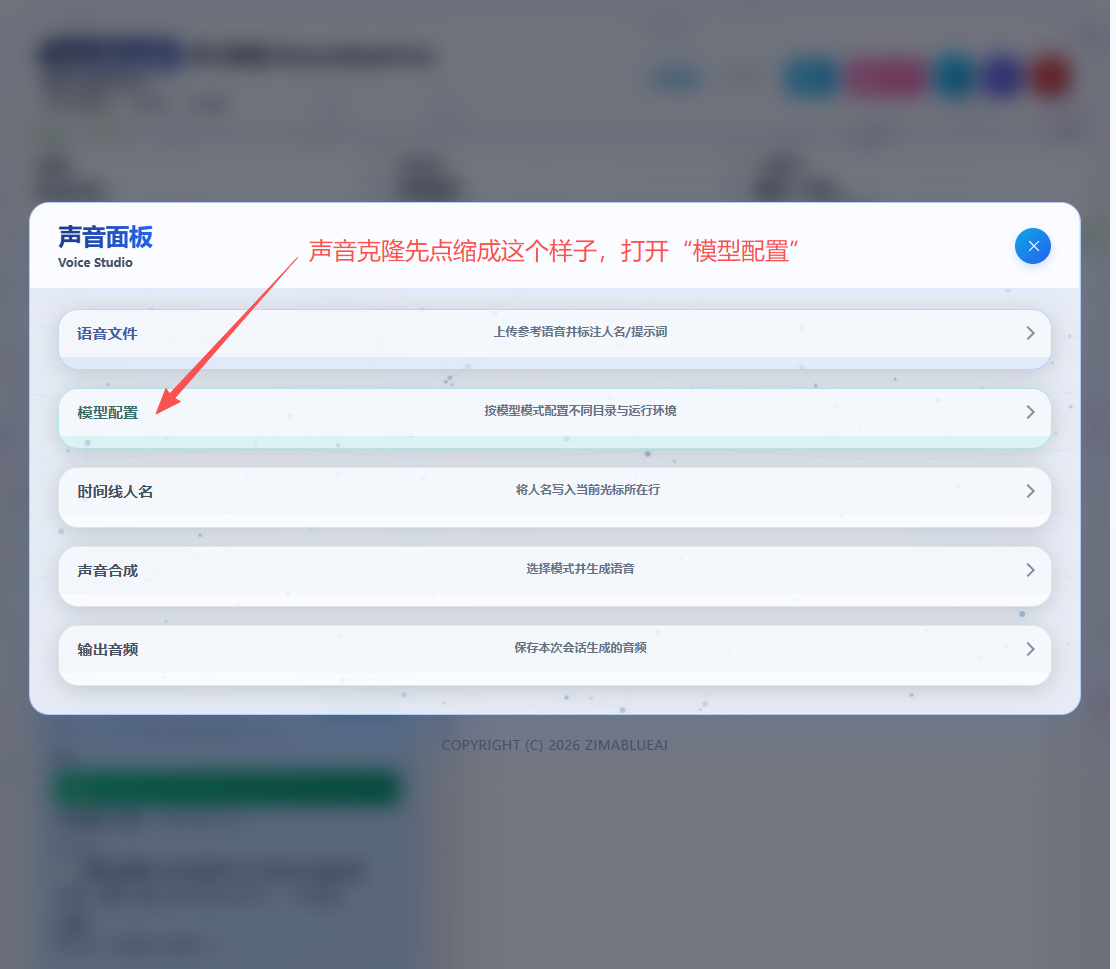
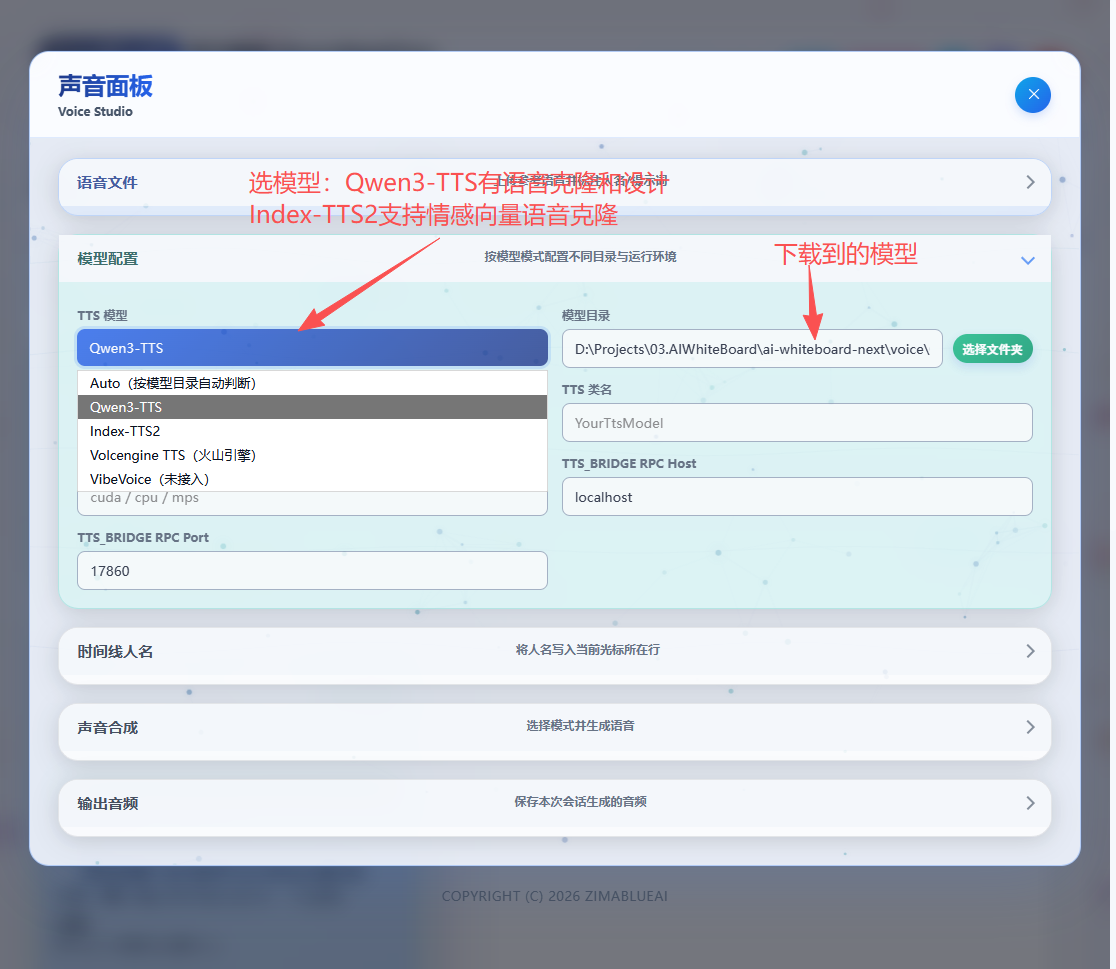
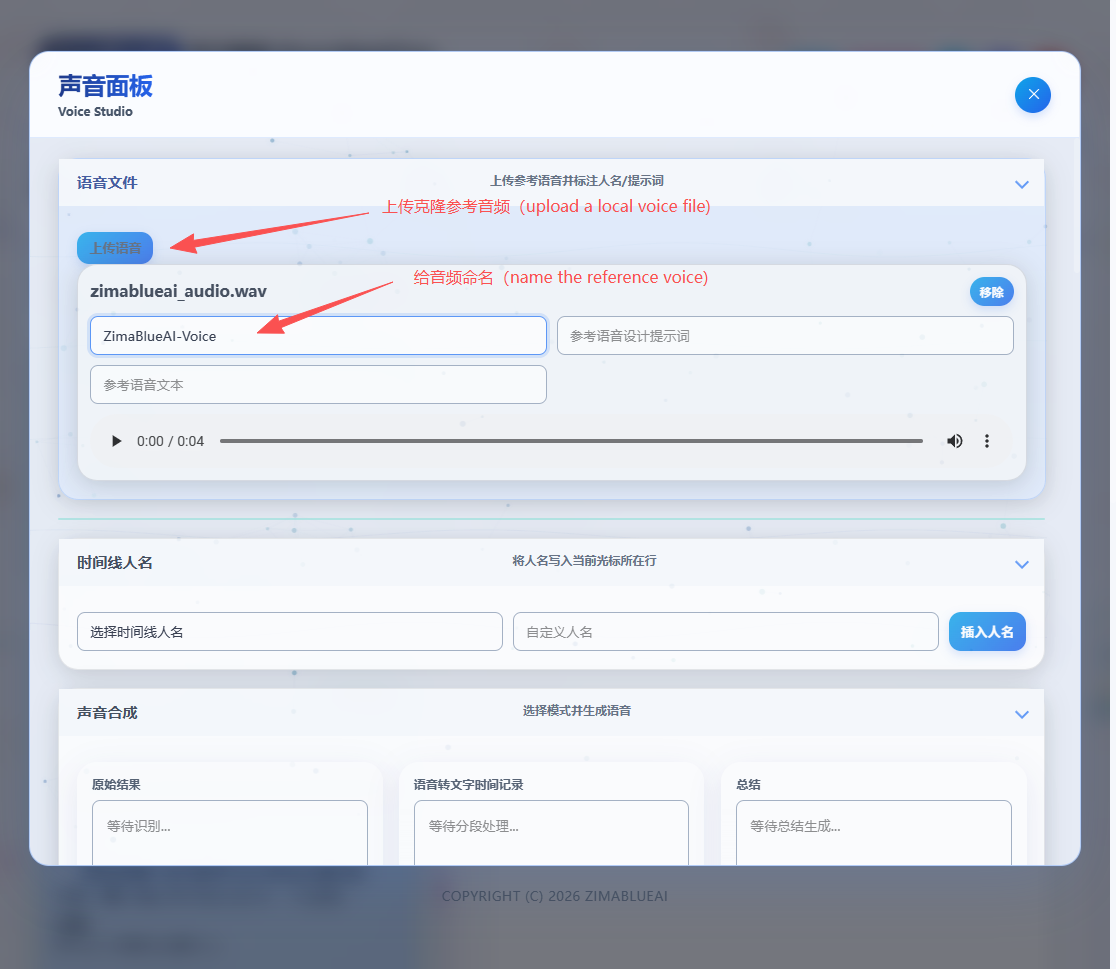
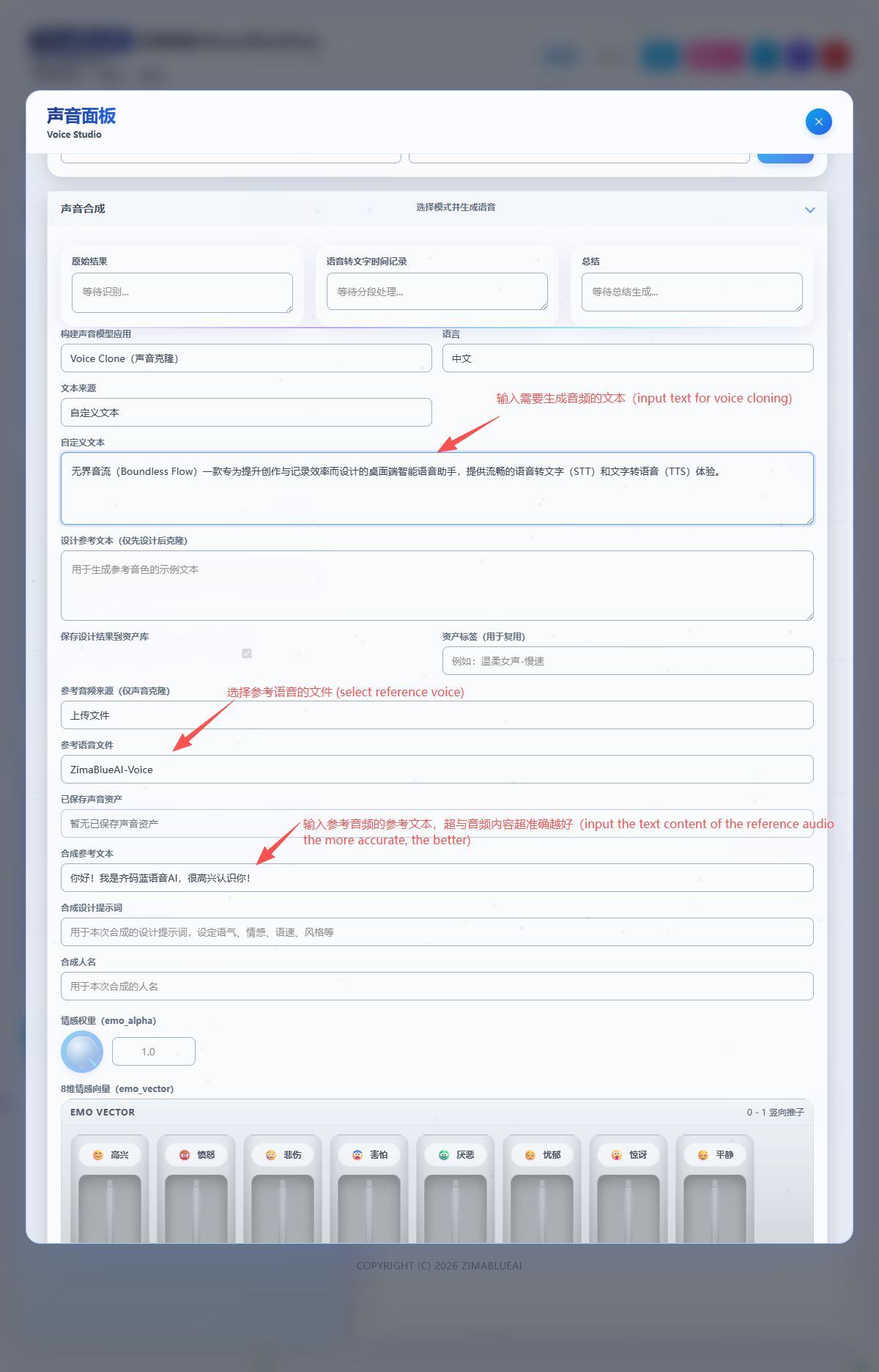
Qwen3-TTS Engine
Qwen3-TTS is a powerful, multi-functional voice synthesis engine that supports three different working modes:
🎙️ Base Model
Provides high-quality, natural, and fluent standard voice synthesis. Suitable for general text reading and audiobook production, generating clear speech without any reference audio.
👥 CustomVoice (Cloning)
By providing a clear 5-15 second reference audio, you can clone a voice highly similar to the reference. Perfect for creating personalized dubbing or digital avatars.
✨ VoiceDesign
No reference audio needed. Directly "design" the voice you want using text prompts. For example, input "A young female voice, speaking happily", and the model will generate a brand new voice matching the description.
Index-TTS2 Engine
Building upon voice cloning, the Index-TTS2 engine introduces finer emotional and stylistic control capabilities:
- Emotional Vector Control: Allows injecting specific emotional vectors during synthesis, giving the generated speech rich emotional colors like joy, sadness, or anger.
- Prompt Guidance: Combined with text prompts, it can more accurately control the tone, intonation, and rhythm of pronunciation, making the cloned voice not only "sound alike" but also "feel real".
Tip: The effect of voice cloning largely depends on the quality of the reference audio. Please try to use audio with clear pronunciation, no background noise, and a moderate speaking rate as a reference.
Local Model Download & Directory Setup (Recommended)
If you use local TTS (Qwen3-TTS / Index-TTS2), download the model files first, then fill in the TTS Model Directory in settings (see ModelScope docs; beginner steps: Appendix A).
Qwen3-TTS (Base / CustomVoice / VoiceDesign)
Download model folders for each mode:
modelscope download --model Qwen/Qwen3-TTS-12Hz-1.7B-Base --local_dir ./Qwen/Qwen3-TTS-12Hz-1.7B-Base
modelscope download --model Qwen/Qwen3-TTS-12Hz-1.7B-CustomVoice --local_dir ./Qwen/Qwen3-TTS-12Hz-1.7B-CustomVoice
modelscope download --model Qwen/Qwen3-TTS-12Hz-1.7B-VoiceDesign --local_dir ./Qwen/Qwen3-TTS-12Hz-1.7B-VoiceDesign
In Boundless Flow settings, set TTS Model Directory to the model folder you want to use (e.g., Base mode uses ./Qwen/Qwen3-TTS-12Hz-1.7B-Base).
Index-TTS2 (Voice Cloning)
modelscope download --model IndexTeam/IndexTTS-2 --local_dir ./IndexTeam/IndexTTS-2In Boundless Flow settings, set TTS Model Directory to the IndexTTS-2 model folder.
Note: In offline mode, models are not auto-downloaded. If the directory does not exist or is not usable, TTS will fail.
Cloud API Service Configuration
In addition to powerful local models, Boundless Flow also supports integrating various mainstream cloud TTS API services, providing you with more diverse voice options and a more stable synthesis experience. Currently supported cloud APIs include:
- Volcengine: Provides a wealth of high-quality voices, supporting multiple dialects and foreign languages.
- OpenAI (TTS): Offers natural and realistic voice synthesis, supporting classic voices like
alloy,echo,fable,onyx,nova, andshimmer. - MiniMax: A leading domestic voice large model, supporting highly expressive and emotional voice generation.
Volcengine Configuration
After selecting Volcengine TTS in the settings panel, the minimum required fields are:
- AppId: Volcengine application identifier
- Token: access token
- Cluster: cluster id (e.g.
volcano_tts/volcengine_tts) - VoiceType: voice id
Optional fields include UID, Encoding, sample Rate, Speed/Volume/Pitch ratios, Emotion, etc. For signup and VoiceType selection, see Appendix C.
Configuration Method: Please go to the "Settings" -> "API Configuration" panel in Boundless Flow, select your desired service provider, and enter the corresponding API Key and related parameters. Once configured, you can directly select the corresponding cloud voices in the TTS interface.
TTS Runtime Environment Configuration
To use the TTS and voice cloning features, you need to ensure that your local environment is correctly configured:
- Full Installation Package: If you are using the full installation package that includes the TTS runtime, no additional configuration is required.
- Lite Package + Runtime Download: If you are using the Lite package, the application will prompt you to download and extract the TTS runtime (Python environment and related dependencies) the first time you use the TTS feature. Please follow the prompts or refer to the detailed instructions in
INSTALL.md.
Copyright(c) ZimaBlueAI
齐码蓝智能(大理市 )有限责任公司