STS Speech Workbench
Speak → live ASR → translation → target-language TTS, in one independent pipeline that can preserve your timbre.
- Standalone config, separate from main STT/TTS
- Automatic voice cloning
- One-key RightAlt operation
- Floating Mini mode
What is STS
STS = Speech-to-Speech. The Boundless Flow STS workbench is an independent simultaneous-interpretation pipeline: you speak in Chinese, and a few seconds later the same voice reads the sentence back in English (or Japanese, Korean…). Use it for stage interpretation, bilingual meetings, draft voiceovers for video.
STS is "stop, then process" — not true streaming. While processing, pressing RightAlt again cancels the job and starts a new recording — perfect for sentence-by-sentence interpretation.
Pipeline overview
Workbench UI tour
After completing the wizard, click the STS icon in the main panel's top toolbar. The workbench has three accordion sections:
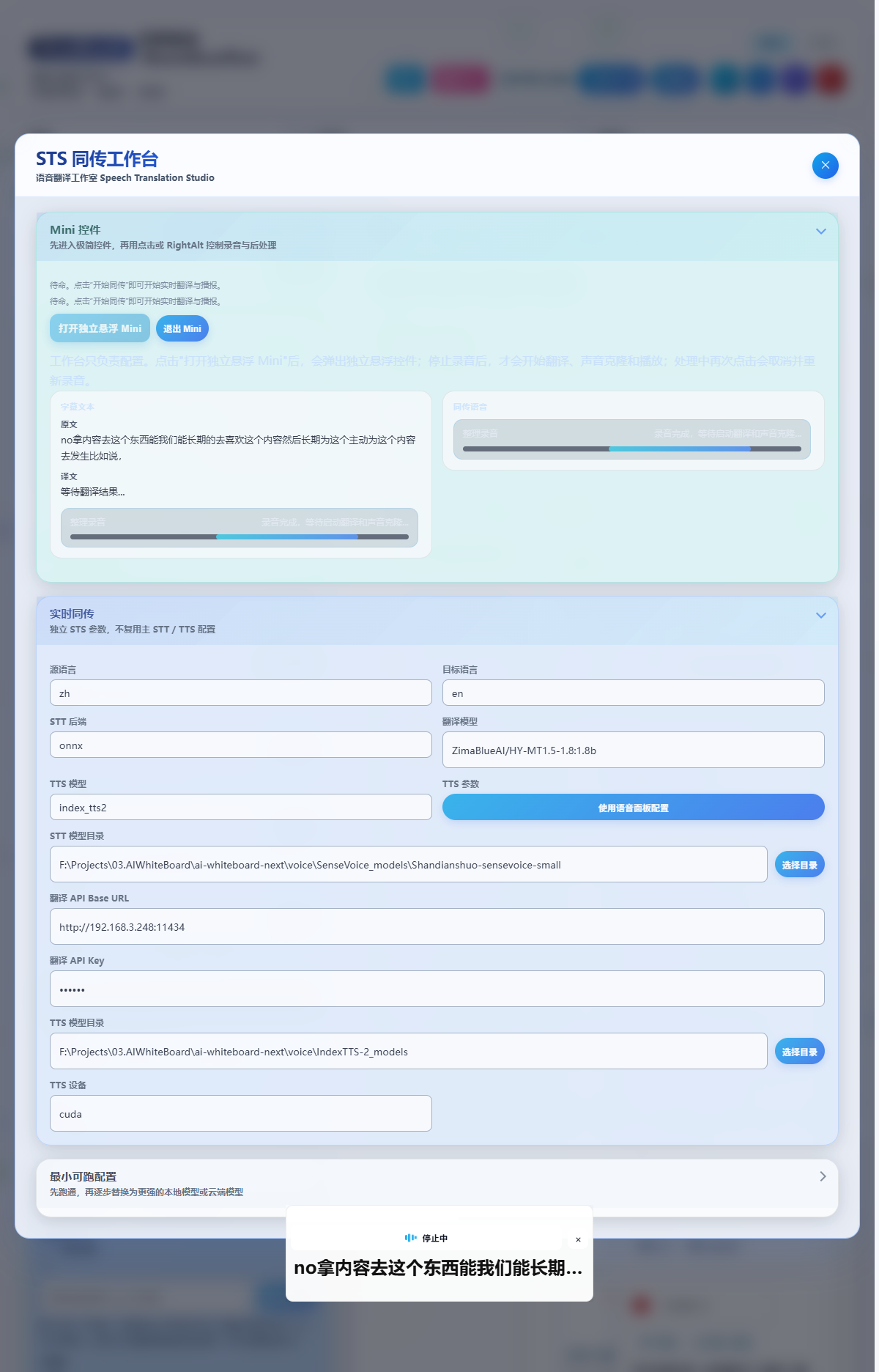
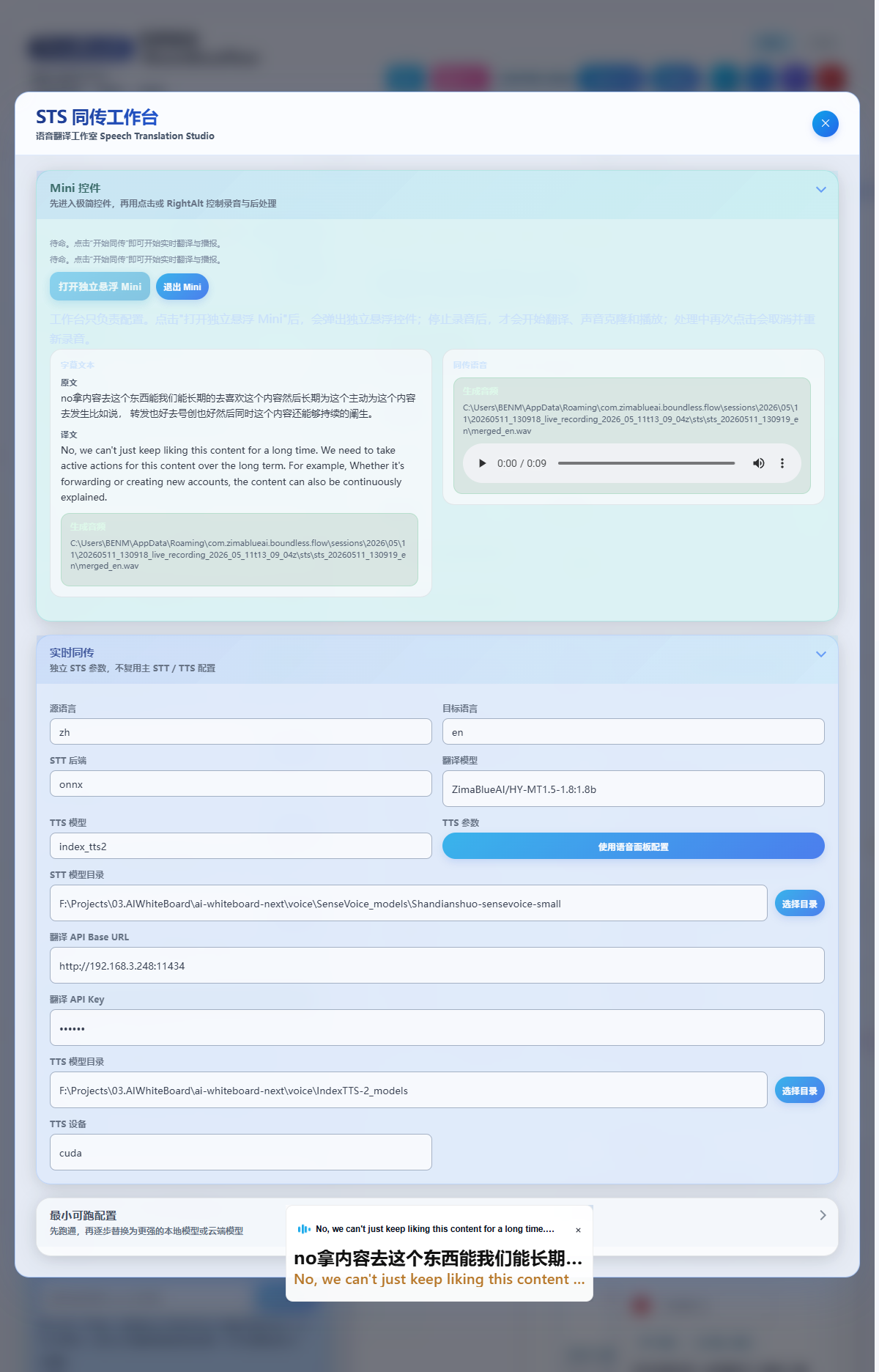
- Source / Target language
- STT backend + Translation model + TTS model
- Per-route model dirs, devices, RPC host/port
- VoxCPM, Volcengine TTS specific params
- Click "Open Floating Mini" to summon the minimal controller
- Lower previews show subtitle text + translated voice status
- Workbench only configures; recording/processing happen in Mini
- Combo A: local STT + OpenAI translate + Volcengine TTS
- Combo B: local STT + OpenAI translate + Qwen3-TTS / Index-TTS2
- 5-step verification checklist
- Historical jobs (jobId / source → target / duration / status)
- Export bilingual subtitles as srt / txt
- Download merged audio as mp3 / wav
Minimal working setups (two recommended)
Combo A · Fastest integration
Goal: first playable interpreted audio in five minutes.
| Field | Value | Note |
|---|---|---|
| STT backend | onnx or funasr | Whichever local realtime model you have |
| STT model dir | Local SenseVoice / Fun-ASR-Nano folder | See STT docs |
| Translation Base URL | https://api.openai.com/v1 | Or any OpenAI-compatible endpoint |
| Translation model | gpt-4o-mini / deepseek-chat | Speed-first |
| TTS model | volcengine_tts | No local download — AppId + Token only |
| Clone reference | This recording (auto) | No need to pick a separate voice file |
Combo B · Voice cloning first
Goal: target-language playback preserves your timbre.
| Field | Value | Note |
|---|---|---|
| STT backend | onnx or funasr | Same as Combo A |
| Translation model | Any OpenAI-compatible model | — |
| TTS model | qwen3_tts or index_tts2 | Needs the corresponding model dir |
| TTS model dir | Local path | See TTS docs |
| Clone reference | This recording + transcript (auto) | No need to pick a separate timbre file |
Parameter reference (excerpt)
| Field | Default | Description |
|---|---|---|
sourceLanguage | zh | auto/zh/en/ja/ko/yue/fr/de/es |
targetLanguage | en | Same enum (no auto) |
sttBackend | sensevoice | onnx / whisper / sensevoice / funasr |
sttChunkIntervalMs | 20 | Frame step in ms; smaller = lower latency, higher CPU |
translationApiBaseUrl | — | OpenAI-compatible base URL |
translationApiKey | — | Translation LLM key |
translationModel | — | Model name, e.g. gpt-4o-mini / qwen-plus |
ttsModel | auto | auto / qwen3_tts / voxcpm / index_tts2 / vibevoice / volcengine_tts |
ttsModelDir | — | Local TTS model directory |
ttsDevice | — | cuda / cpu / mps |
ttsRpcHost / ttsRpcPort | localhost / 17860 | Local TTS RPC service |
ttsVoxcpmRuntimeDir | — | VoxCPM-specific runtime path |
ttsVolcengine.* | — | Volcengine TTS AppId / Token / Cluster / VoiceType |
Operation sequence
Open the floating Mini
STS workbench → "Open Floating Mini". The minimal controller pops at the bottom-center of the screen.
Press Right Alt to record
Mini enters "Recording"; the waveform bars animate.
Press Right Alt again to stop
Enters "Processing": ASR → translate → voice clone → TTS synthesis.
Auto playback
Once synthesized, Mini switches to "Playing", reads the translation, then returns to idle.
Press during processing = cancel & re-record
If the sentence felt off, just press the hotkey again — no need to wait for the current job.
Troubleshooting
Stuck on "processing"? Verify translation / TTS credentials are filled. Cancel from Mini, then check the "Subtitle text / Translated voice" preview logs in the workbench.
Timbre not preserved? Make sure TTS model is one of qwen3_tts / index_tts2 / voxcpm with the local model dir set. volcengine_tts uses VoiceType from the Volcengine console — voice cloning requires creating a custom voice there first.
Want "speak while it translates"? Current STS is the "stop-then-process" model. True streaming interpretation is on the roadmap via LLM-side Realtime APIs (e.g. GPT-Realtime-Translate) as a sub-mode.
Copyright(c) ZimaBlueAI
ZimaBlueAI (Dali) Co., Ltd.