AI Proofreading & Smart Summary
Boundless Flow not only converts your speech into text but also uses powerful AI models to intelligently proofread (the "Principal" feature) and summarize the recognition results. This makes it an ideal tool for meeting minutes, interview records, and other scenarios.
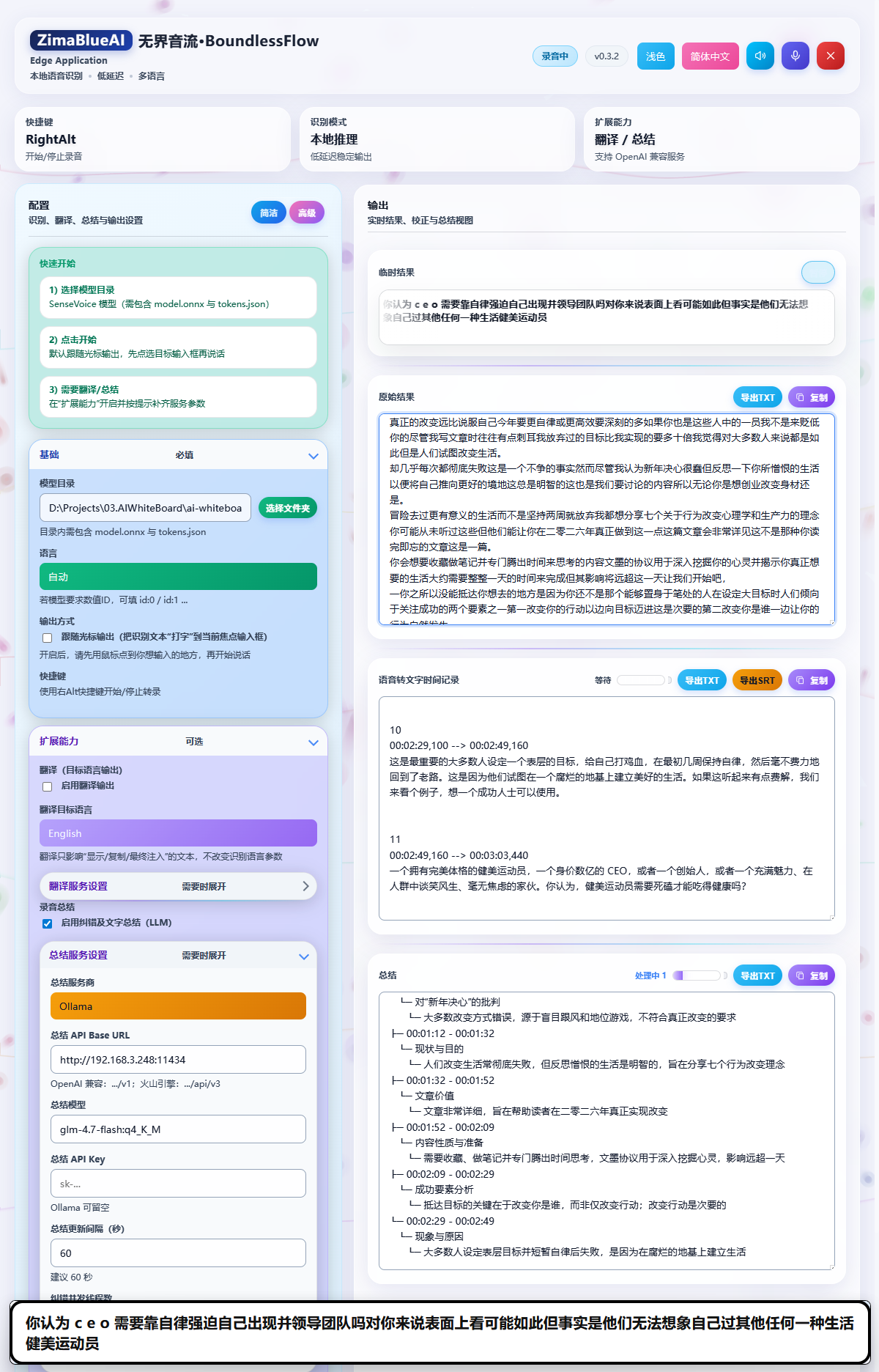
AI Proofreading (Correction Feature)
Speech recognition inevitably produces typos or ungrammatical sentences. Boundless Flow's AI proofreading feature can automatically polish and correct the recognized text, making it more accurate and fluent.
How to Enable AI Proofreading
Find Settings
Find the Recording Summary option in the settings.
Enable Feature
Check Enable Correction and Text Summary (LLM).
Configure API
Configure the summary service provider, API Base URL, model, and API Key (see below).
Tip: The proofreading feature runs automatically in the background and replaces the original recognition results with the corrected text. You can set the Correction Concurrency Threads (default 2, max 4) to improve processing speed.
Smart Summary Feature
During long recording sessions, Boundless Flow can periodically generate smart summaries of your meetings or recordings. This helps you quickly review key points and extract crucial information.
Configuring Summary Services
To use the smart summary feature, you need to configure the following:
- Summary Provider: Select the AI service provider you use, such as OpenAI, Ollama, or Volcengine.
- Summary API Base URL: Enter the API address of the service provider. For example, OpenAI compatible interfaces are usually
https://api.openai.com/v1, and Volcengine ishttps://ark.cn-beijing.volces.com/api/v3. - Summary Model: Enter the model identifier required by the server, such as
gpt-4o-mini,doubao-seed-1-6, etc. - Summary API Key: Enter your API key. If you are using a local model (like Ollama), this can be left blank.
- Summary Update Interval (seconds): Set the time interval for generating summaries. A setting of
60seconds (generating a summary every minute) is recommended.
Recommended Proofreading & Summary Model (Ollama)
If you run proofreading and summary locally with Ollama, a recommended model is (see Ollama docs; beginner steps: Appendix B):
ollama pull qwen3:4bSuggested settings:
- Summary Provider: Ollama
- Summary API Base URL:
http://localhost:11434(no/v1— Boundless Flow auto-calls Ollama's native/api/chat;http://localhost:11434/v1is also accepted) - Summary Model:
qwen3:4b - Summary API Key: optional
Summary Results Display
Smart summary results will be displayed in the application interface in the form of a Tree Payload or Queue Payload. You can view, copy, or export these summary contents at any time.
Copyright(c) ZimaBlueAI
齐码蓝智能(大理市 )有限责任公司